Claude vs ChatGPT: which one should you use?
Claude and ChatGPT are close on writing, research and documents, so the choice comes down to what you create. Pick ChatGPT if you need image generation, which Claude does not have. Pick Claude if design matters most, such as presentations, or if you prefer its more natural writing. Both paid plans start at $20 a month.
AI Assistant Showdown: ChatGPT vs Claude vs Gemini
A free guide comparing ChatGPT, Claude and Gemini side by side.
Claude and ChatGPT are the two most popular AI tools, and for everyday work they are closer than you might expect. This guide runs the same prompts through both, on the paid plans, for writing, research, documents, images, presentations, websites and small apps. Most rounds are a tie. A few are not, and those are the ones that should decide which one you use.
Why it makes sense to pick one
The more you use one of these tools, the more it learns about you and saves to memory, and the better it responds. Jumping between the two is usually not the best option.
Both have paid plans that start at $20 a month. Paying unlocks a lot, including the smartest models in each app. Everything below was run on the paid version of both.
Write an email
Help with writing is the most common use for AI. The same prompt went into a regular chat in each tool:
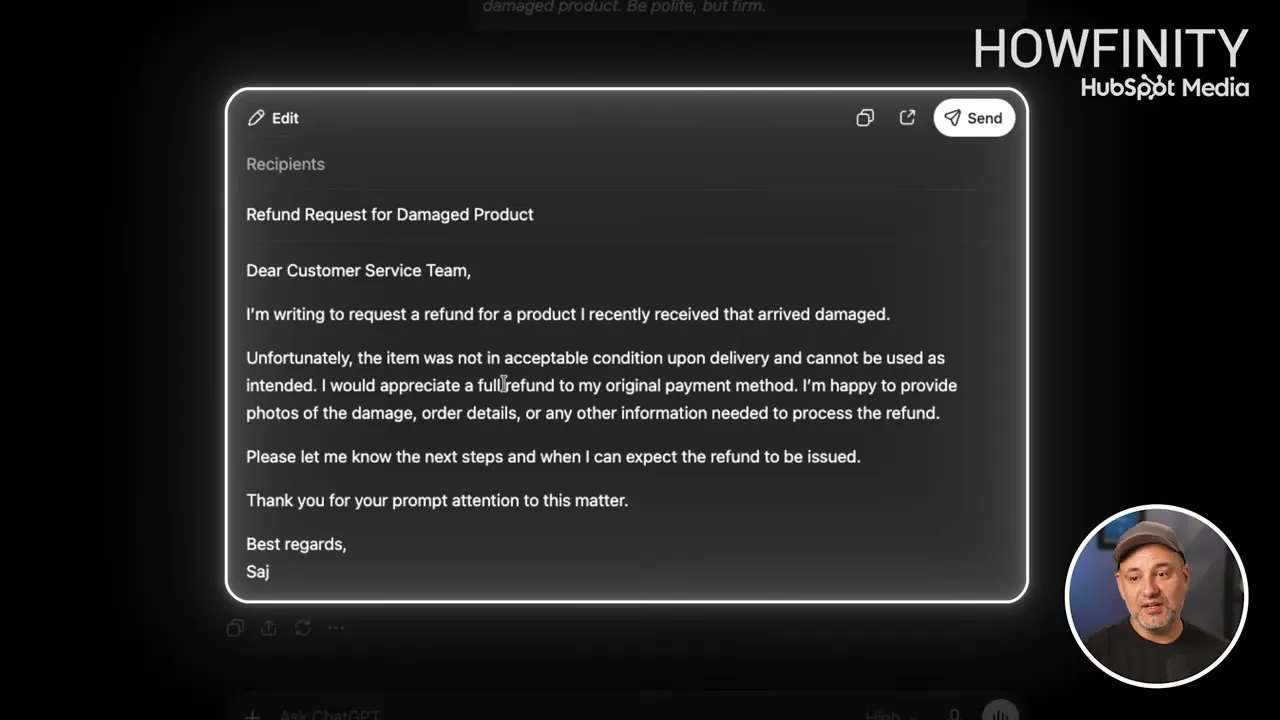
Write a professional email asking for a refund after receiving a damaged product. Be polite, but firm.ChatGPT’s email is organized, clear and to the point. It arrives in a card that is easy to copy. Press Send and ChatGPT offers to connect Gmail so you can send it from there.
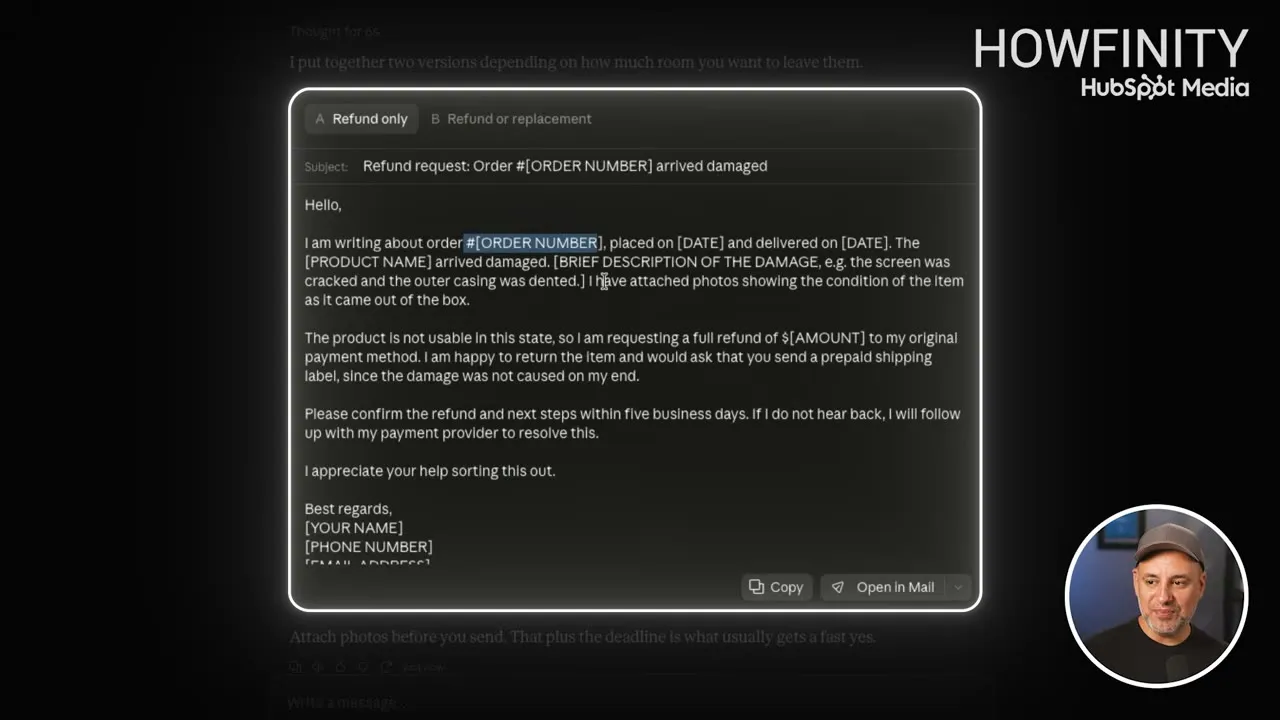
Claude’s email is about the same length. It has a subject line, and buttons to Copy it or Open in Mail. Two things are different:
- The tone. In the video, Saj prefers Claude’s writing. It sounds more natural and conversational, and less like AI.
- The placeholders. Claude left gaps such as
[ORDER NUMBER],[PRODUCT NAME]and[AMOUNT], because the prompt never gave those details. ChatGPT went ahead and wrote a more generic email without them.
Claude also wrote two versions, Refund only and Refund or replacement.
The default writing style is one of the main reasons to prefer one tool over the other. If you do a lot of writing with AI, this is the test to pay attention to.
Rewrite your own draft
A more realistic test is to write the first draft yourself and ask AI to make it sound better. This prompt went into both tools, followed by the pasted draft:
Rewrite this so it sounds more conversational, keeps my writing style, shortens it by about twenty percent, and removes anything that feels overly AI generated.Both rewrites turned out well. For writing, neither tool is clearly better. It comes down to which style you like, so run a couple of prompts in each and read the results. Saj now uses Claude for nearly everything he writes.
Teach it your writing style
You can teach both tools your writing style to get closer to your own voice. Claude makes this easier with skills. A skill teaches Claude one specific way of writing, and you can have different skills for an email, a blog post and a YouTube script. ChatGPT technically has the same thing, but there it requires the business plan.
Research and web search
A lot of people now ask ChatGPT, Claude or Gemini a question instead of typing it into Google and going through the links. The test prompt:
I'm looking for the best business credit card for a small business that travels frequently. Compare the top options, annual fees, rewards, and recommend the best overall value.- ChatGPT made a table of four cards, picked the one it thinks is best, and ended with a bottom line that ranks all four.
- Claude also made a table, with three cards, and gave an overall pick. It came to the same conclusion as ChatGPT, but it did not rank the options as well.
ChatGPT has had web search since 2023. Claude went a long time without any web search. Both now have deep research, which can analyze hundreds of websites and usually takes 10 to 15 minutes to give you a full report.
ChatGPT still has a small edge in search. It is not big enough to say you should always use ChatGPT for research.
Summarize a document
Both tools let you press the plus sign, add a file such as a PDF, and ask about it. The same PDF went into both with this prompt:
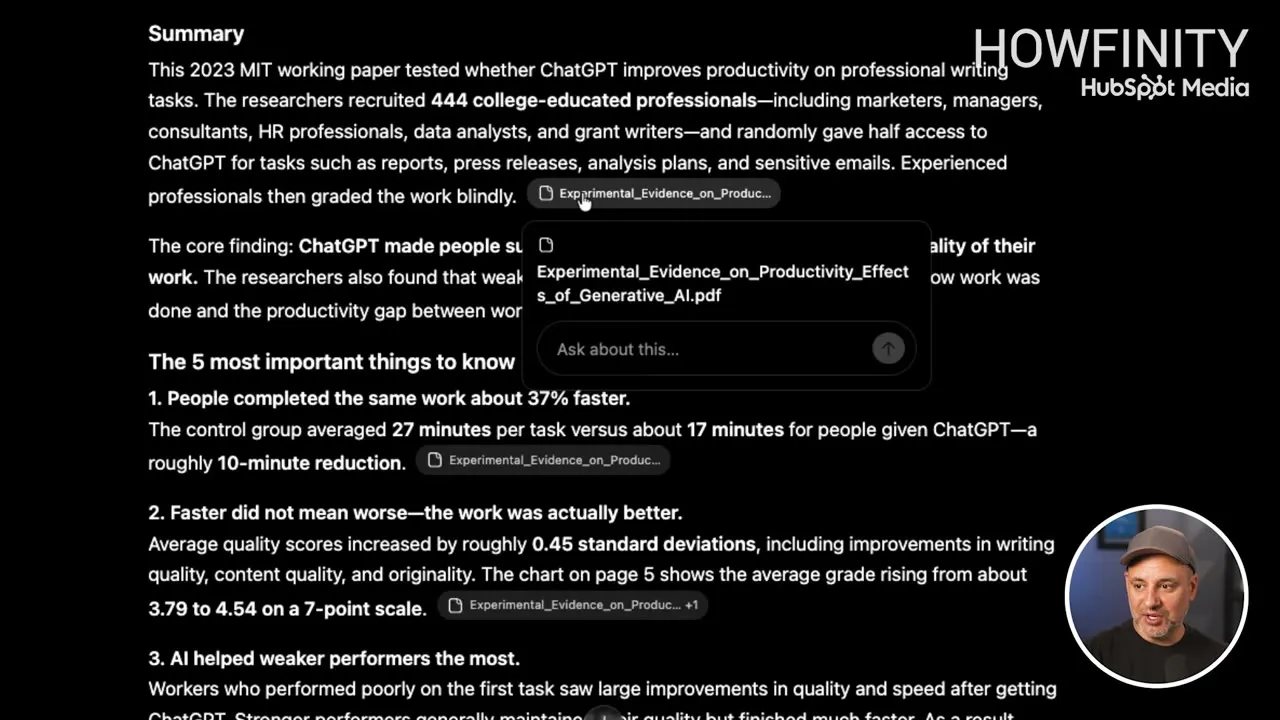
Summarize this document and tell me the five most important things I should know.Both handled it well. ChatGPT does one thing here that Claude doesn’t. It adds a small source tag after each point. Click a tag and you can ask a question about that exact part of the document.
Writing, research and documents are the three most common ways people use AI. Both tools have had a few years to get good at them, so none of the three gives you a clear winner.
Create and edit images
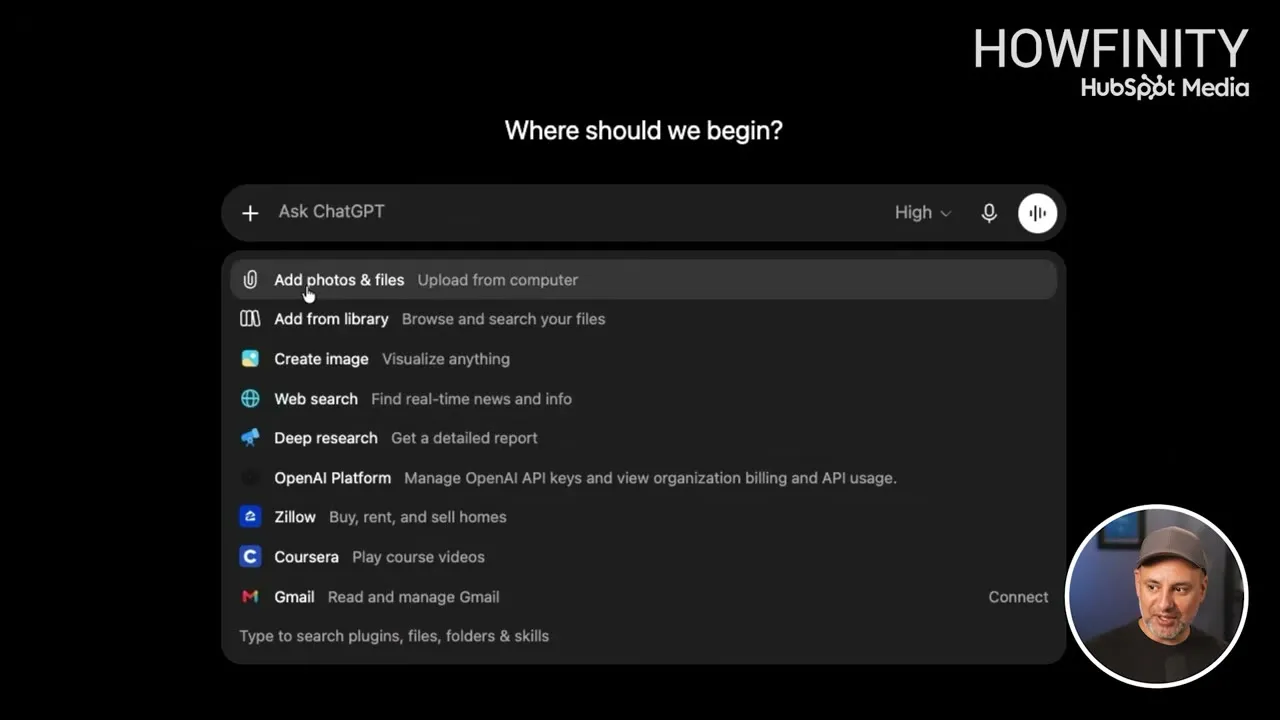
This is where the two actually differ. Press the plus sign in ChatGPT and most of the menu has a match in Claude: uploading files, web search, deep research and connecting other apps. Create image does not. Claude has never had a model that generates images.
In the video, Saj rates ChatGPT’s image model as the best available at the time of recording, with the one inside Google Gemini the only one that comes close.
- In ChatGPT, press the plus sign and choose Create image.
- Upload a logo, or a photo of a product.
- Describe where you want it.
put my logo on a coffee mug in an empty cafe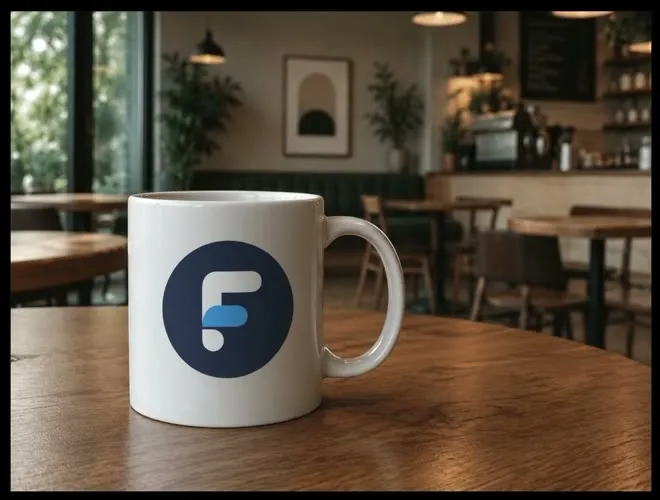
ChatGPT combines what you upload with a scene it creates from scratch. It is also an image editor. Choose Edit on the image and describe what you want to change:
add some steamIn the video, steam appears over the mug and everything else stays exactly the same. You can download the image straight from ChatGPT.
If creating images is your priority and you only want one tool, ChatGPT is the clear choice. Saj uses Claude for more things than ChatGPT, but he still makes his images in ChatGPT, including the thumbnail for this video.
Make a presentation with Work and Cowork
ChatGPT has a Work tab next to Chat. Claude has Cowork. In these modes the tool creates things for you, such as a whole presentation or a folder of files, and doesn’t only give you a reply.
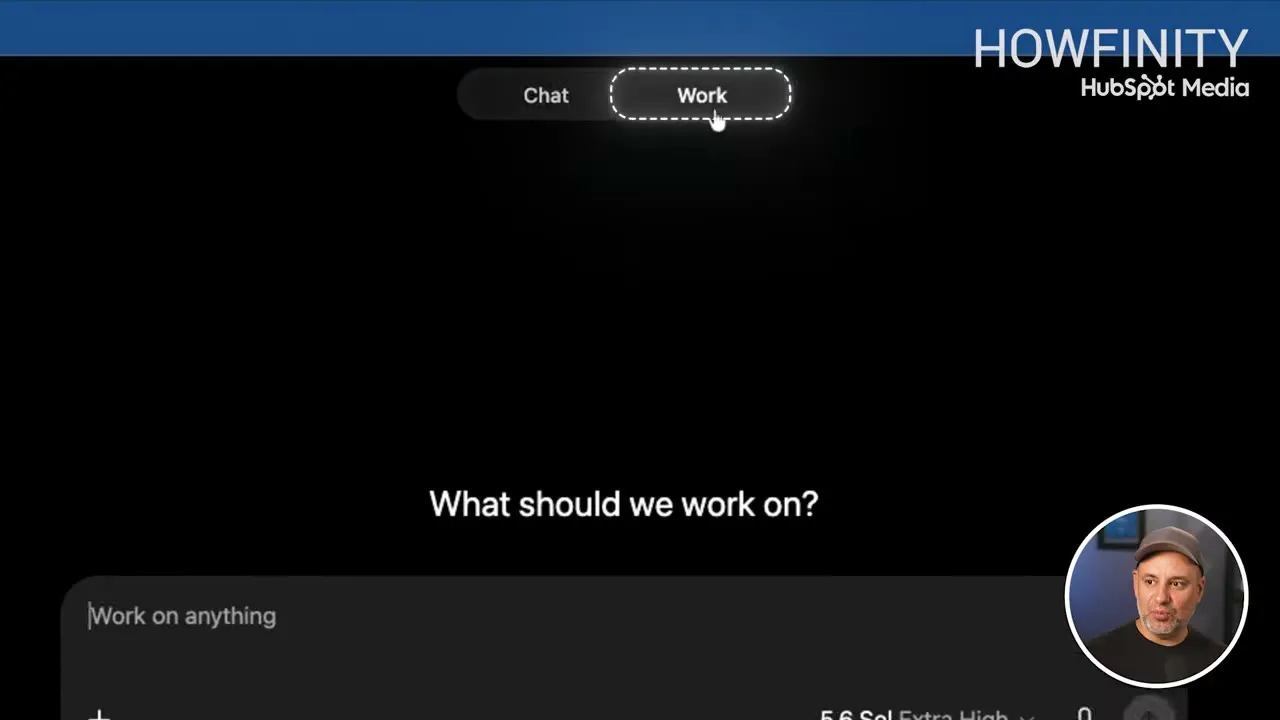
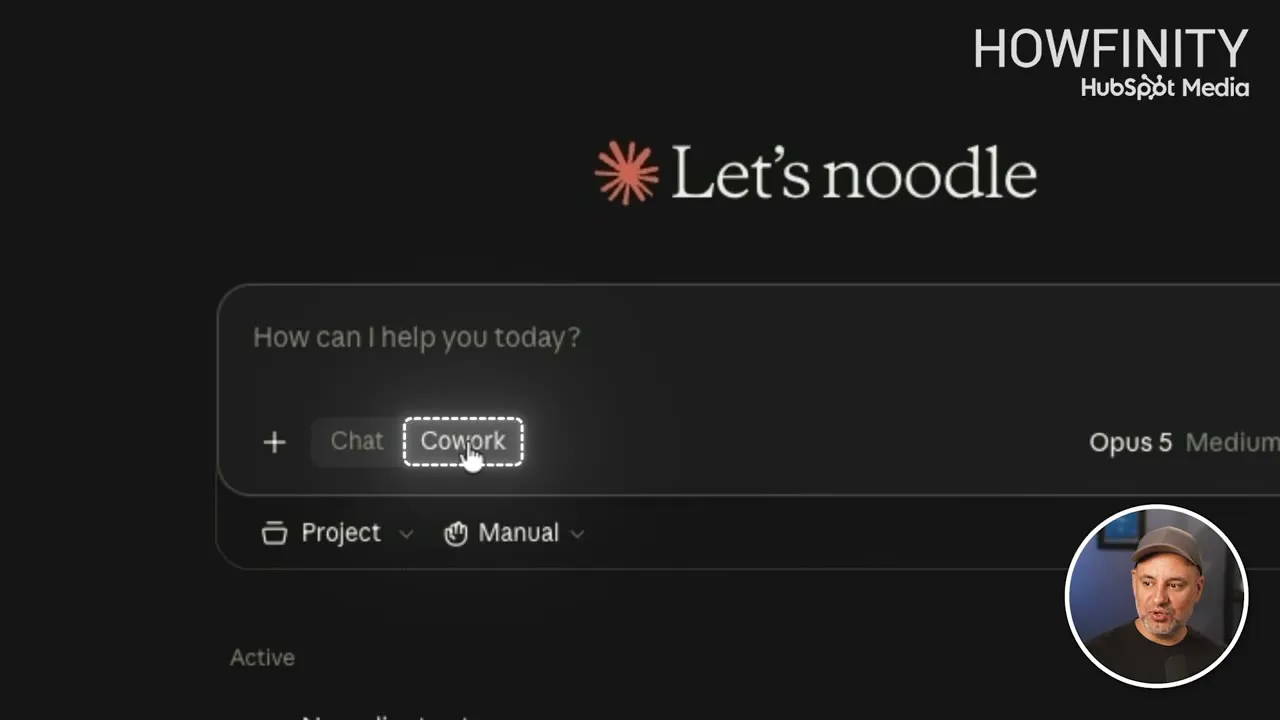
Both also have projects now. A project is a contained folder that keeps your work organized. Both have a desktop app too, and with it they can create files directly in a folder on your own computer.
The test prompt was kept simple:
create a 10 slide presentation about using claude vs chatgpt for work- ChatGPT asked nothing and made assumptions. It gives you a preview inside ChatGPT, and the deck is also a PowerPoint file, so you can open it in PowerPoint to make more edits.
- Claude asked three questions first, including who the presentation is for. Its slide design also came out nicer.
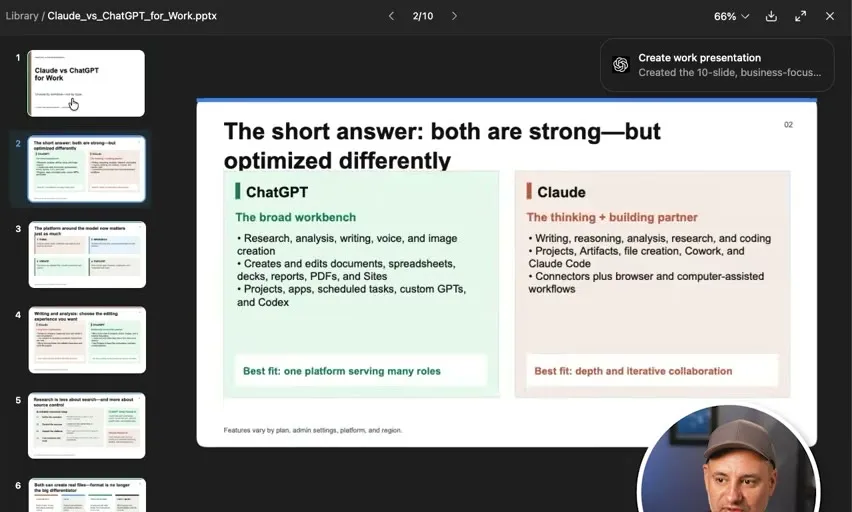
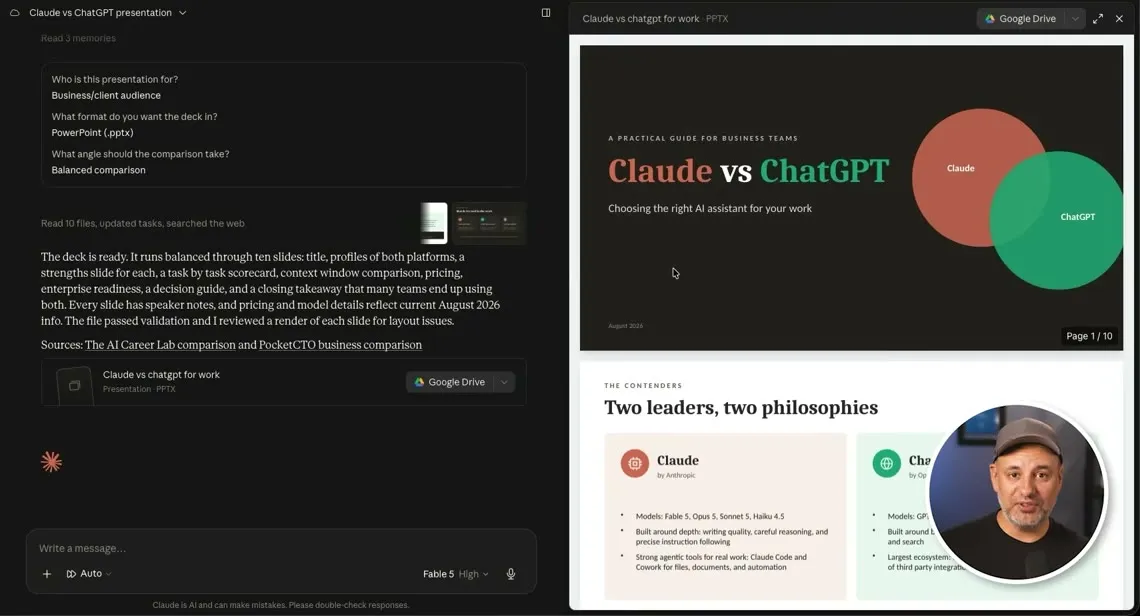
Design is the one area where Saj would always pick Claude over ChatGPT.
Claude Design
Claude also has a separate design platform on the Claude website. It comes with a Claude subscription and requires a paid plan. You can use it to create slides, documents and even video animations.
Claude Design can’t generate images the way ChatGPT does. It creates its designs with code in the background. The animation shown in the video was made that way.
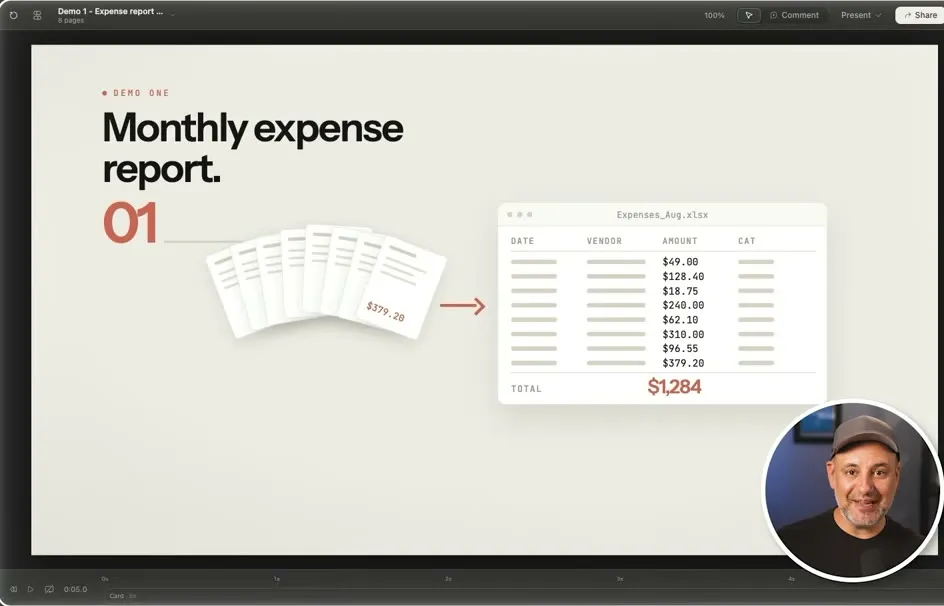
If design is your priority, Claude is the clear winner.
Build a website
Both tools got the same prompt, a modern website for New Slate Films, a Chicago video production company. The prompt asked for a premium, minimalist design with a dark color palette and large video backgrounds, and listed what to include, starting with the homepage headline.
- ChatGPT made a colorful site with a lot of images. It followed the text in the prompt and added good marketing text of its own. If you are a marketer, ChatGPT will likely do a better job on the copy.
- Claude made a totally different design. The text it wrote itself was also pretty good. It left placeholders for the videos, because the prompt had no video links.
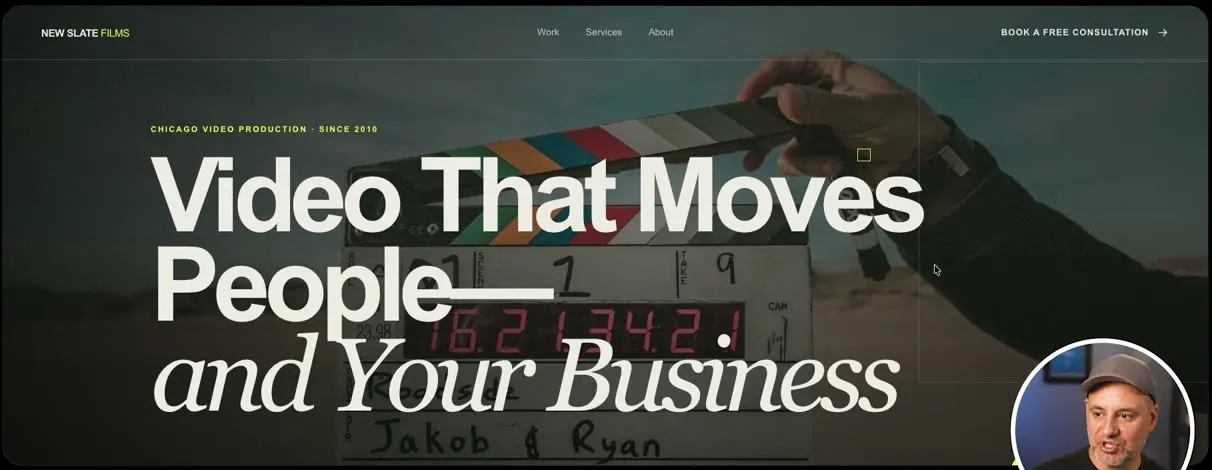

The bigger difference is sharing. ChatGPT creates a link you can share, which it calls a hosted site. Claude asks you to download the site as an HTML file, which is not as easy to share.
In most cases Saj still prefers Claude’s design choices, though in this one example ChatGPT did a very good job.
Build a small app
Both can also build small working apps from one prompt:
Create a monthly budget calculator where I can enter my income, bills, groceries, and other expenses.Claude built a working budget calculator. Type in a number and the totals update in real time. Claude makes it as an artifact. Choose Publish artifact, then Publish & copy link, and you have a link you can send to anyone. On a Team plan you can keep it private to your team members.
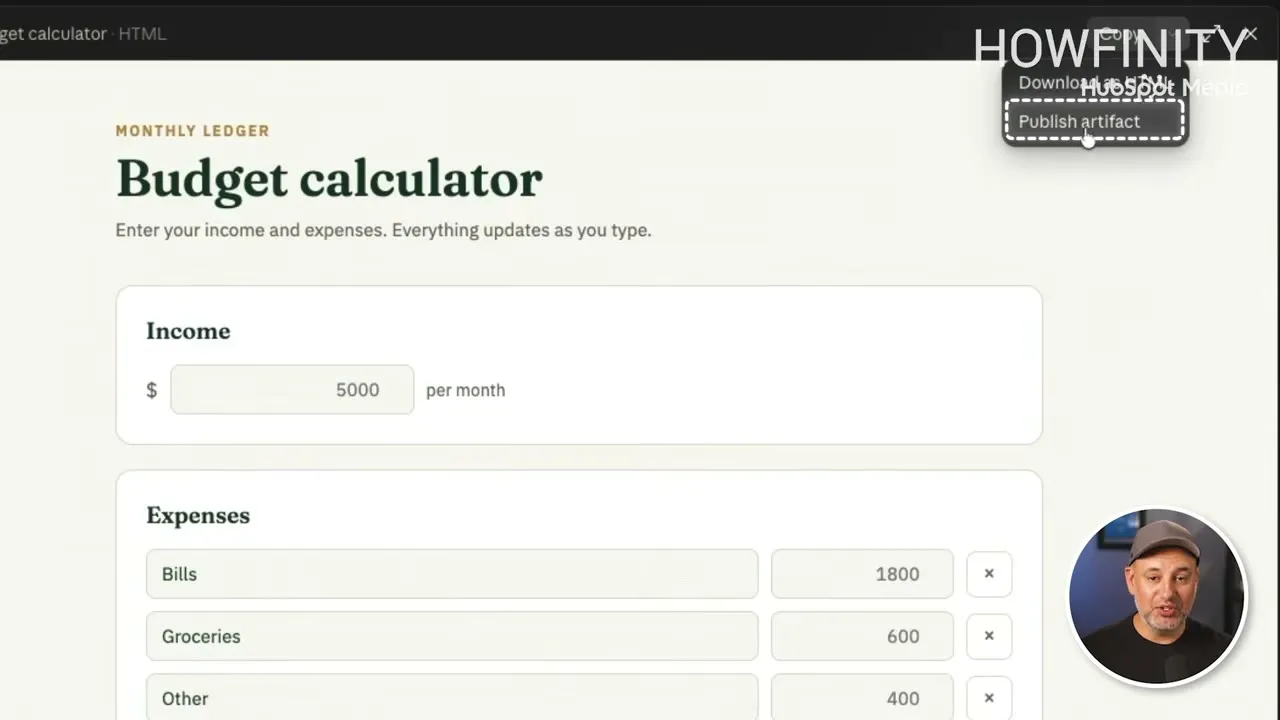
ChatGPT’s version worked too and had a few more extras. It also gives you an easy link to share, using the same Sites feature that hosts its websites.
For small apps, the two are tied.
Head-to-head results
The presentation Claude made picks its own winners on a task-by-task slide. Here is what it picked, and where Saj agrees:
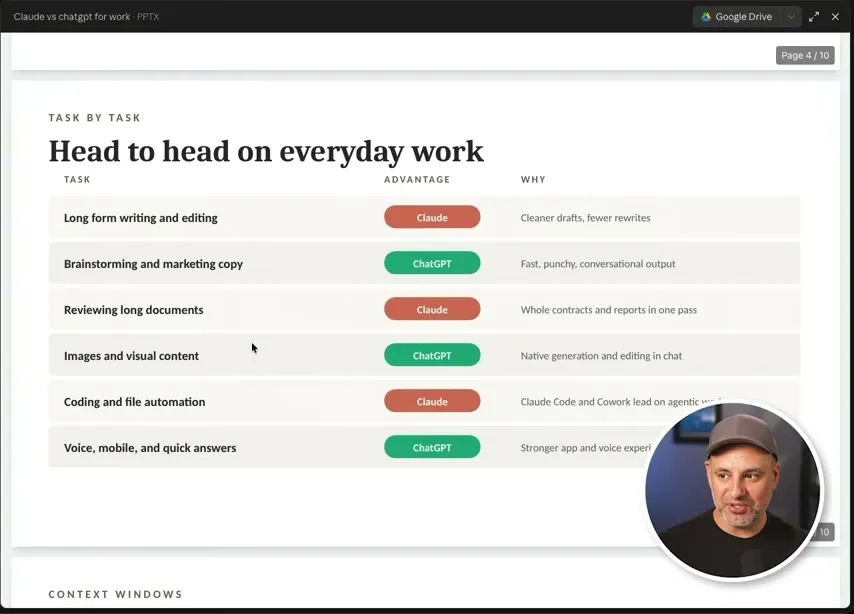
- Long-form writing and editing: Claude. He agrees.
- Brainstorming and marketing copy: ChatGPT. He is mixed on this one. ChatGPT is better at marketing copy, but he still uses Claude for brainstorming.
- Reviewing long documents: Claude. He agrees.
- Images and visual content: ChatGPT, because image generation and editing are built in. Claude Design is still good at creating presentations and animations.
- Coding and file automation: Claude. These are very close, especially ChatGPT’s Codex and Claude Code, which the video does not cover.
- Voice, mobile and quick answers: ChatGPT. He prefers its voice and mobile app over Claude’s.
For its final pick, the deck says the most common answer is both. There is no right or wrong pick, and many of the tests were close. Two cases are clear:
- If you need the best coding or the best design, Claude wins.
- If you need image generation, for example to create ads, ChatGPT is the only one that has it.
If you are already paying for one, run a few of the prompts above in both and see which results you prefer.
Common questions
Is Claude better than ChatGPT?
Not across the board. In the video the two are very close on writing, research and working with documents. Claude wins on design, such as presentations, while ChatGPT wins on images, which Claude cannot generate, and has a small edge in web search.
Which is better for writing, Claude or ChatGPT?
It comes down to which writing style you like. ChatGPT is clear and to the point, while Claude sounds more natural and conversational and is what Saj now uses for nearly everything he writes. Run the same prompt in both and read the results.
Can Claude generate images like ChatGPT?
No. Claude has never had a model that generates images, while ChatGPT can create an image and then edit it in the same chat. Claude Design, which needs a paid Claude plan, creates slides, documents and animations with code, but it does not generate images.
Which is better for research, Claude or ChatGPT?
ChatGPT has a small edge. It has had web search since 2023, and in the test it ranked its options more clearly. Both reached the same recommendation, and both have deep research, which usually takes 10 to 15 minutes to produce a full report.
How much do Claude and ChatGPT cost?
Both have paid plans that start at $20 a month. Paying unlocks a lot, including the smartest models in each app. Everything in this comparison was run on the paid version of both.
Should I use both Claude and ChatGPT?
It usually makes sense to pick one, because the more you use a tool, the more it learns about you and the better it responds. Even so, the comparison deck Claude made in the video says the most common answer is both, and Saj uses Claude for most things while still using ChatGPT to create images.
AI Assistant Showdown: ChatGPT vs Claude vs Gemini
A free guide comparing ChatGPT, Claude and Gemini side by side.
AI Assistant Showdown: ChatGPT vs Claude vs Gemini
A free guide comparing ChatGPT, Claude and Gemini side by side.
Get the free guide