How to use HubSpot AEO to track your brand in AI search
HubSpot AEO tracks how your brand appears in AI answer engines like ChatGPT, Gemini and Perplexity. Its dashboard shows your brand visibility, sentiment and competitor landscape. Prompt tracking follows the questions your buyers ask, citations show where AI engines pull information from, and recommendations give you the next actions to improve your visibility.
Quick steps
- Start a free trial of HubSpot AEO and set up your account.
- On the Dashboard, check your brand visibility score to set a baseline.
- Open Sentiment analysis to see whether AI tools describe your brand positively, negatively or neutrally.
- Scroll down to Competitor landscape to compare your visibility with competitors.
- Open Prompts to review the prompts you track, and add or adjust prompts to match your business priorities.
- Open Citations to see where AI engines pull their information from.
- Open Recommendations and work through the next best actions.
HubSpot AEO
HubSpot's answer engine optimization tool. See how your brand shows up in ChatGPT, Gemini and Perplexity, track the prompts your buyers use, and get recommendations to improve.
More buyers now turn to AI tools like ChatGPT, Gemini and Perplexity for recommendations, product comparisons and purchase decisions. HubSpot AEO shows you how your brand shows up in those answers, how it is described and what to do to improve it. This guide walks through the dashboard, prompt tracking and recommendations as the video shows them.
Know what AEO measures
AEO stands for answer engine optimization. Traditional SEO focuses on rankings, traffic and clicks. AEO shifts the focus to:
- Brand mentions: how often AI tools mention your brand.
- Citations: where AI engines pull their information from.
- Sentiment: whether your brand is described in a positive, negative or neutral way.
- Share of voice: how often you appear compared with competitors inside AI-generated answers.
HubSpot AEO gives you visibility into each of these, so instead of guessing whether your brand appears in AI search, you can measure it.
Tour the dashboard
Start a free trial from the link on this page and set up your account. Once your account is set up, you land on the AEO dashboard. Across the top are four tabs: Dashboard, Prompts, Citations and Recommendations.
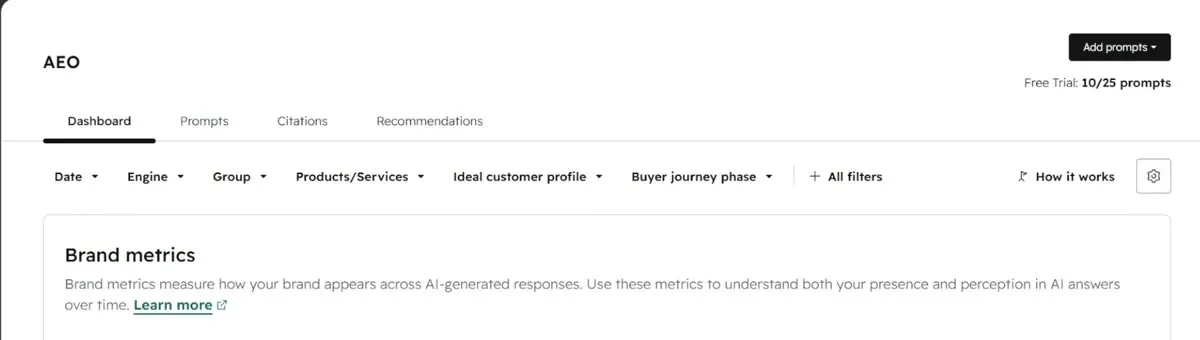
The main areas on the dashboard are:
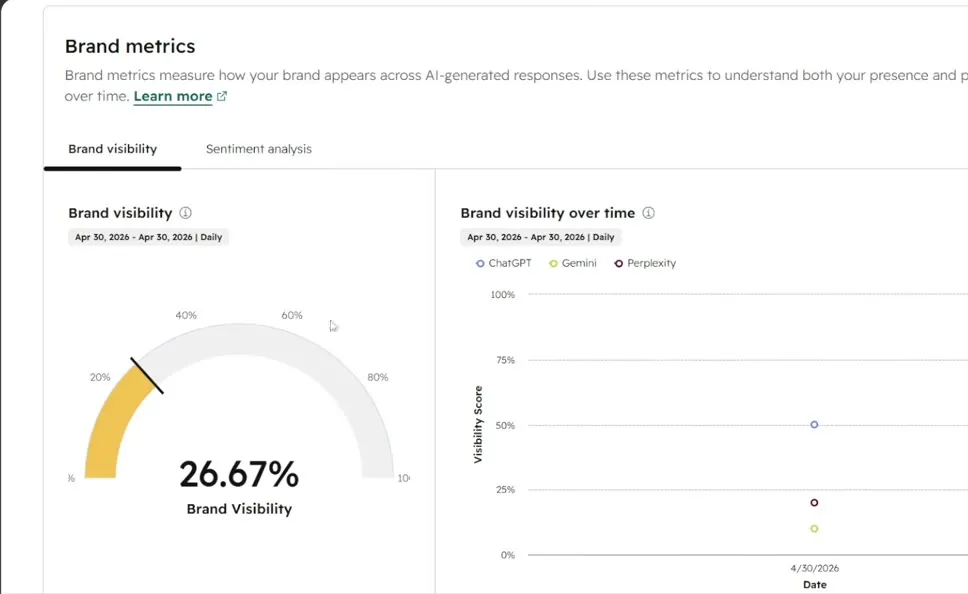
- Brand visibility: once AEO collects your data, it gives you a percentage and a gauge of how visible your brand is.
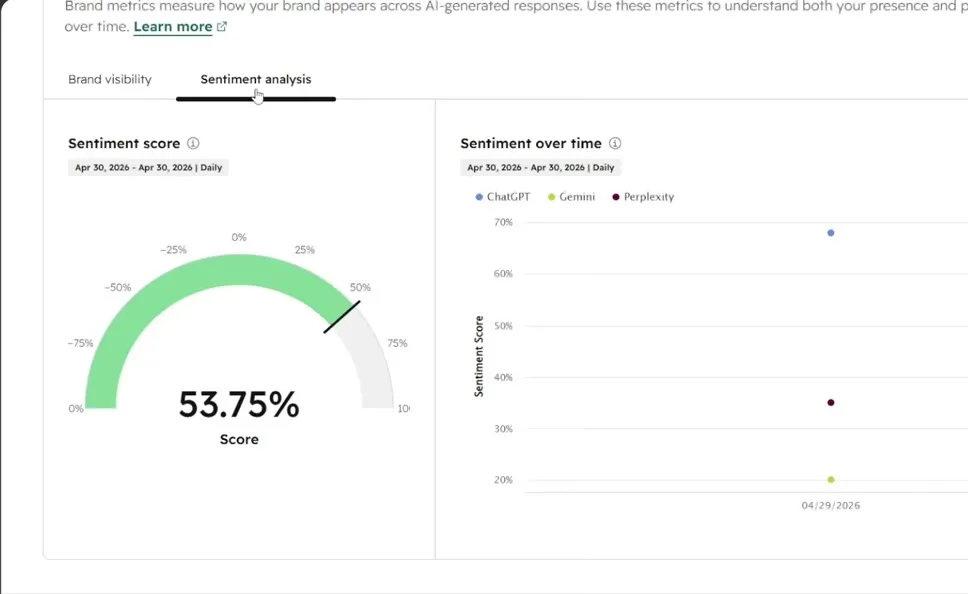
- Sentiment analysis: right next to it, another score that works like a temperature meter.
- Competitor landscape: scroll down to see other competitors it found in a similar space and how they compare with you.
Understand the onboarding prompts
The prompts used during onboarding are not scraped from random searches. They are designed to reflect the buying journey of your ideal customer. That means you are not tracking unrelated questions. You are monitoring the kinds of prompts real buyers might use as they move from awareness to consideration to decision.
Open Prompts to see the list of every prompt AEO is tracking. You can search the list, and the panel on the side shows how your brand comes up in the mentions for each prompt.
Check your brand visibility and sentiment
The Brand visibility tab on your dashboard gives you a snapshot of how visible your brand is across answer engines, with a chart of your visibility over time for ChatGPT, Gemini and Perplexity.
Click Sentiment analysis to see whether AI tools mention your brand positively, negatively or neutrally. Showing up in ChatGPT doesn’t mean it is describing you in a positive light.
Then scroll down to Competitor landscape to compare your visibility directly with competitors in a similar space. It helps you answer the questions that matter: Are you showing up consistently? Are competitors appearing more often than you? And when your brand is mentioned, is the tone helping or hurting?
Customize your prompt tracking
Go back to the top and click Prompts. This is where you customize your strategy.
- Review the prompts you are tracking in the list.
- Use Add prompts to add your own, or adjust existing prompts based on your business priorities.
- Click a prompt to see how ChatGPT, Perplexity and Gemini answer it and whether your brand is mentioned.
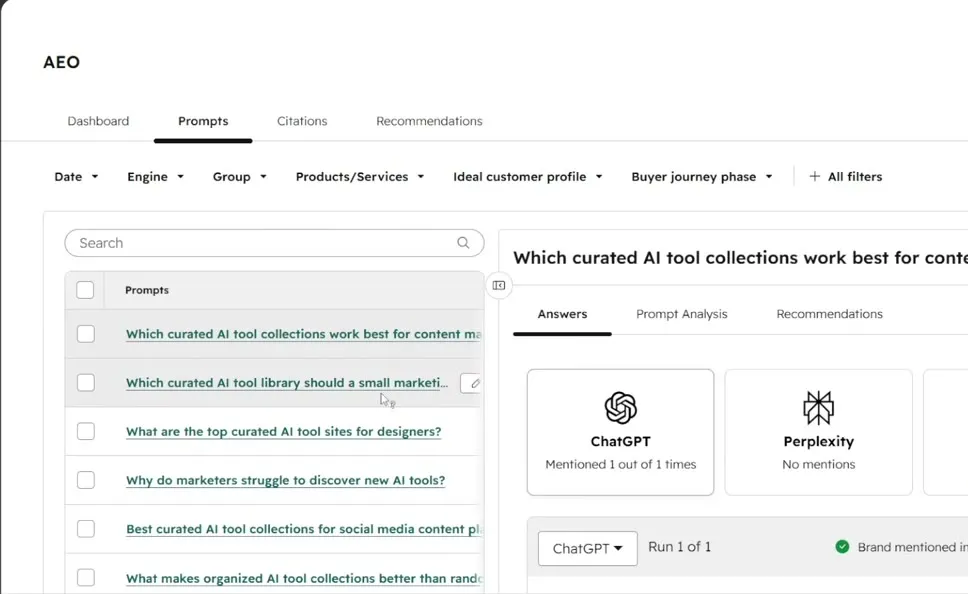
Not every prompt carries the same intent. Someone asking a broad educational question is very different from someone comparing vendors, searching for the best solution or looking for a product with a specific feature. Prompt tracking lets you focus on the questions that matter most to your pipeline.
Act on the recommendations
Click Recommendations across the top. Rather than just giving you data, this tab gives you practical recommendations to improve your AI visibility. They are built from your citation analysis, and each one shows its content type, content channel and priority.
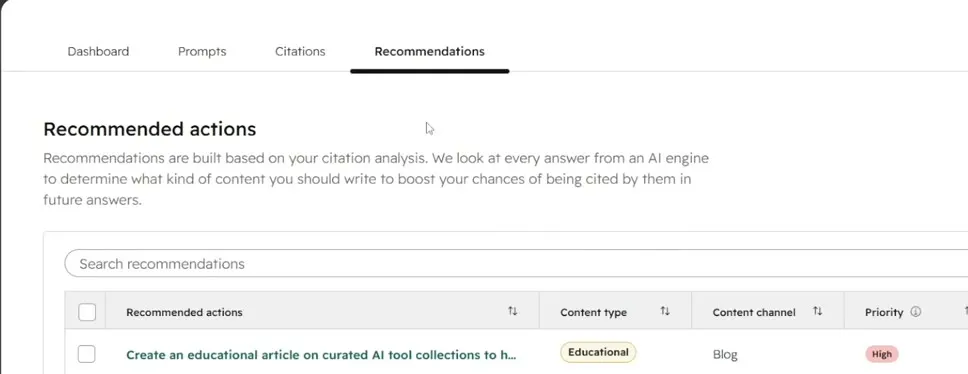
Recommendations can include:
- Creating new content
- Improving key pages
- Strengthening authority signals
- Expanding your offsite presence
Instead of wondering what to do next, you get a clear roadmap for increasing visibility in answer engines.
Use a simple routine
If you use HubSpot AEO regularly, here is an approach from the video:
- Check your visibility score to establish a baseline.
- Review your prompt tracking to see which questions matter most and whether your brand appears for them.
- Analyze your citations in the Citations tab to understand where AI engines are pulling information from.
- Go into Recommendations to prioritize the next best actions across content, website updates, social content or your broader digital presence.
Checked regularly, all within this dashboard, it gives you a pulse of where you stand with AI tools and a clear roadmap to improve. The question changes from “Am I ranking?” to “Am I being mentioned? Am I being cited? And is that visibility influencing traffic, leads and conversions?”
Pick the right package
HubSpot offers AEO as a standalone product, and it is also included in the broader HubSpot for marketers platform. If your main goal is AI visibility tracking, the standalone product is the more accessible entry point. If you want deeper integration, where you can track insights and act on them across your full marketing workflow, the larger package may be a better fit. Look at both and decide what is best for your business.
Common questions
What is AEO?
AEO stands for answer engine optimization. It is about how your brand shows up inside AI-generated answers in tools like ChatGPT, Gemini and Perplexity.
How is AEO different from SEO?
Traditional SEO focuses on rankings, traffic and clicks. AEO shifts the focus to brand mentions, citations, sentiment and share of voice inside AI-generated answers.
What does HubSpot AEO track?
It shows how visible your brand is across AI answer engines, how your brand is described, and how you compare with competitors. You can track prompts that match your customers' buying journey and get recommendations to improve.
Where do the prompts in HubSpot AEO come from?
The prompts used during onboarding are not scraped from random searches. They are designed to reflect the buying journey of your ideal customer, from awareness to consideration to decision. You can also add your own or adjust them.
How much does HubSpot AEO cost?
The video does not give prices. HubSpot offers AEO as a standalone product, and it is also included in the broader HubSpot for marketers platform. The standalone product is the more accessible entry point if AI visibility tracking is your main goal.
HubSpot AEO
HubSpot's answer engine optimization tool. See how your brand shows up in ChatGPT, Gemini and Perplexity, track the prompts your buyers use, and get recommendations to improve.
HubSpot AEO
HubSpot's answer engine optimization tool. See how your brand shows up in ChatGPT, Gemini and Perplexity, track the prompts your buyers use, and get recommendations to improve.
Start a free trial