How to create an AI action figure in ChatGPT
To turn a photo into an action figure, open ChatGPT, type a prompt that asks for a realistic action figure of the person in the photo in its plastic box packaging, with a name, a subheading and three or four accessories. Press the plus sign, upload your photo, and press send.
Quick steps
- Open ChatGPT at chatgpt.com, or the ChatGPT app on your phone.
- Type an action figure prompt with the name, a subheading and three or four accessories.
- Press the plus sign, choose to upload from your computer and pick your photo.
- Press send and wait for the image.
- Click the image and press Save to download it.
- Run it again with a different prompt for a hyper-realistic or claymation style.
People are uploading their photo to ChatGPT and getting back an action figure of themselves, standing in a toy box with their name on top and a few accessories beside them. You need one photo and one prompt. Below are the three prompts from the video, one for each style: Barbie doll, hyper-realistic and cartoon claymation.
Open ChatGPT
On a computer, go to chatgpt.com. On your phone, download the ChatGPT app. Everything happens in an ordinary chat.
Write the Barbie doll style prompt
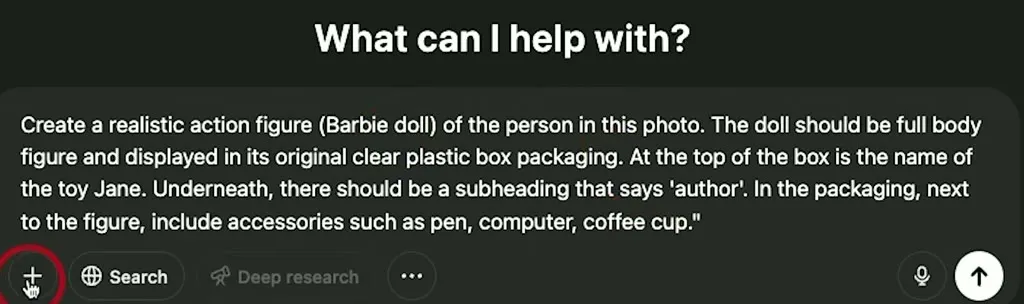
Type this prompt in the chat box. It is the one used for the Barbie doll style:
Create a realistic action figure (Barbie doll) of the person in this photo. The doll should be full body figure and displayed in its original clear plastic box packaging. At the top of the box is the name of the toy Jane. Underneath, there should be a subheading that says 'author'. In the packaging, next to the figure, include accessories such as pen, computer, coffee cup.Change three things before you send it:
- The name. Replace “Jane” with the name you want on top of the box. It can be your own name if the figure is of you.
- The subheading. “author” is a profession. Use your own, or leave it out.
- The accessories. List three or four items that go in the box next to the figure.
Upload your photo and send
- Press the plus sign under the prompt.
- Choose to upload from your computer, find your photo and press enter.
- The photo appears in the chat box next to your prompt. Press send.
ChatGPT returns the figure in its box, with the name at the top, the subheading under it and your accessories beside the figure.
At the time of the video, a free ChatGPT account could do this only a couple of times a day. With the $20 a month upgrade you could make as many as you wanted.
Download the image
- Click the finished image in the chat.
- Press Save at the top. The image downloads to your computer.
Hyper-realistic style
For a more realistic figure, start again: press the plus sign, upload the photo, and use a prompt that describes the whole package. This one turns the photo into a teacher named Michelle:
Create a realistic action figure of a female teacher named Michelle. She is displayed inside a plastic and cardboard package against a green chalkboard background filled with math and alphabet doodles. The packaging is a warm brown tone and says 'TEACHER' at the top and 'MICHELLE' at the bottom. Include accessories like a stack of books, a whiteboard with markers, a red pen, and a reusable coffee cup. She is dressed in a gray cardigan, white collared shirt, and dark slacks, standing in a neutral pose, smiling gently. The style is realistic and well-lit, like a high-quality product mockup.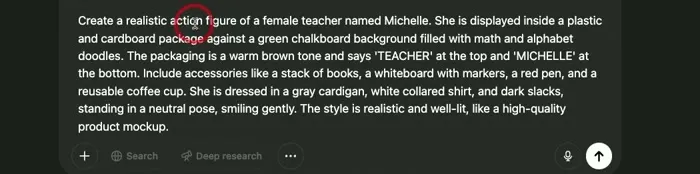
Compared with the Barbie doll prompt, this one also sets the background, the color of the packaging and the outfit. The result is a more hyper-realistic figure.
Cartoon claymation style
The third style is a cartoon figure inspired by claymation, with rounded shapes and soft, playful colors. Upload the photo again and use this prompt, with your own name, title, clothes and accessories:
Create a cartoon-style, claymation-inspired action figure of a person named Joe, with the title 'Producer' written below the name on tan cardboard packaging. The figure is sealed in a clear plastic pack, wearing a blue hoodie, light blue jeans, and white sneakers. Accessories include a silver Apple laptop, a jar of pickles, a cup of coffee, and a yellow pencil. Use a soft, playful color palette with rounded shapes and a handcrafted feel.
A lot of it is the same as the other prompts: a name, a title, the packaging, the outfit and a few accessories.
Common questions
Can I make an AI action figure with the free version of ChatGPT?
Yes, but at the time of the video a free ChatGPT account could only do it a couple of times a day. With the $20 a month upgrade you could make as many as you want.
Can I do this on my phone?
Yes. Download the ChatGPT app and use the same prompt and photo. On a computer, go to chatgpt.com.
What do I need to change in the prompt?
The name on top of the box, the subheading under it (the profession, such as "author", if you want one) and the three or four accessories in the packaging. For the other styles you can also describe the outfit and the background.
How do I save the action figure image?
Click the image in the chat, then press Save at the top. It downloads to your computer.
What styles of action figure can ChatGPT make?
The video shows three, a Barbie doll style, a hyper-realistic style in a cardboard package with a themed background, and a cartoon-style claymation figure in a blister pack. The prompt decides the style.